Koma - AI Manga & AI Comics
- 3.7
- Rating
- 10.00K
- Installs
- Free
- Price
 Analysis by App-foxy
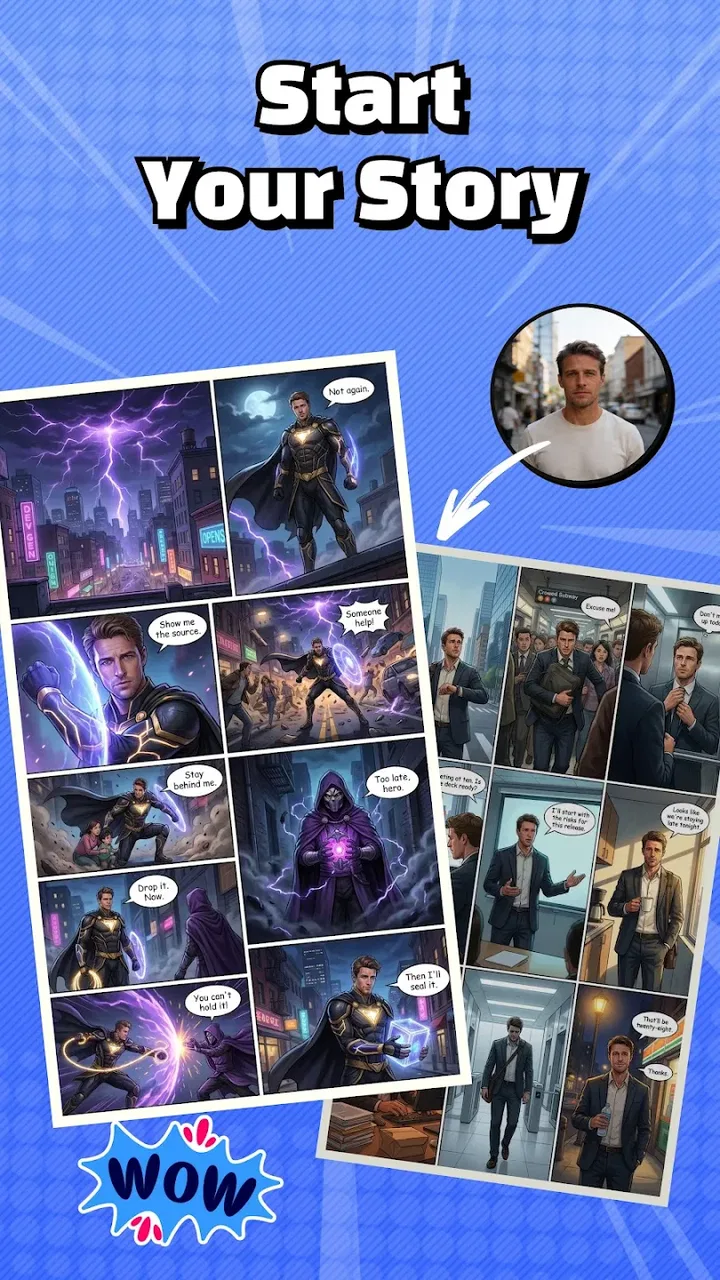
I spent time with Koma as an AI comic-making app, and my first impression was that it is aimed at people who want to turn an idea into a manga-style scene without starting with a blank drawing canvas. That distinction matters. This is not simply a reader for digital comics, nor is it a conventional illustration app with a large manual toolkit. Its appeal is the use of artificial intelligence to help shape comic artwork across different visual styles.
For someone who has a story in mind but lacks drawing experience, that can remove a frustrating first barrier. I could think in terms of a character, a mood, a setting, or a short scene instead of worrying immediately about anatomy, perspective, and line work. At the same time, AI-generated comic art is not a substitute for careful editing. The most useful way to approach Koma is as a visual starting point and an idea-development tool, not as an automatic replacement for every step of comic production.
How Koma feels as an AI comic-making app
Koma is listed in the Comics category and is developed by TUNESPHERE. Its store summary presents it as an AI comic creation tool that covers a wide range of art styles, while the short store description is simply “Koma.” In practice, that positioning makes the app most interesting for quick experiments: testing how the same concept might look as a manga panel, a stylized illustration, or another comic-inspired treatment.
You May Also Like

 AccuWeather: Weather Radar
AccuWeather Review: A Quick, Clear Forecast for Everyday Decisions
For everyday plans, the best forecast is the one you can understand quickly. AccuWeather makes rain timing, radar, and local conditions easy to act on, with a few trade-offs.

 Hill Climb Racing
Why Hill Climb Racing Still Turns Crashes Into One More Run
A tiny car, a bumpy hill and one more upgrade: Hill Climb Racing keeps resurfacing because its simple chaos makes every near-miss feel personal.

 AliExpress - Shopping App
AliExpress Makes Global Shopping Feel Personal, but Shoppers Bear the Risk
AliExpress turns a global marketplace into a pocket-sized discovery engine. Its reach is useful, its shopping loop compelling, and its trade-offs easy to miss.

 Lords Mobile: Kingdom Wars
Lords Mobile Is a Kingdom-Building Routine, Not a Quick Match
A case-by-case verdict on the building, battles, device demands, and social commitments that make Lords Mobile rewarding for some players and exhausting for others.

 PDF Scanner app - TapScanner
TapScanner Makes Paperwork Easier to Capture, Check, and Share
TapScanner makes scanning with a phone feel less like a rescue operation and more like a dependable step in getting work done. Its capture tools are useful, though not flawless.

 Block Blast!
 Shows How Much a Puzzle Game Can Leave Out
A quiet grid game shows why puzzle players increasingly value instant clarity, repeatable skill and low-pressure play—and where the genre still needs to catch up.
More From Our News Desk
View All News


The broad style focus is more important than it may sound. A comic is not defined only by its characters and dialogue; the visual language affects whether a scene feels funny, dramatic, mysterious, soft, or energetic. Being able to explore different directions can help when I am still deciding what kind of project I want to make. It is also useful for mood boards, character concepts, social posts, personal story ideas, and rough visual planning.
I would not treat the first result as a finished page. AI artwork often needs human judgment, especially when a scene contains several characters, a precise action, readable text, or a repeated character who must look consistent from panel to panel. The app’s strongest role is therefore closer to a rapid creative sketchbook than a complete professional publishing suite.
That makes the experience approachable, but it also creates a particular trade-off. The less control I demand, the more enjoyable the process feels. The more exact I want the result to be, the more likely I am to notice the limits of an AI-first workflow. Users who enjoy exploring possibilities will probably get more from Koma than users who already have a finished page layout in mind.
What the free entry point really means
Koma is free to install, which makes it easy to test without committing money at the beginning. That is valuable for casual creators because the central question is not whether AI comics sound interesting, but whether this particular workflow fits the way they think. I recommend using the free access first with a small, clearly defined project rather than immediately planning a long graphic novel.
The app also includes in-app purchases priced from $4.99 to $79.99 per item. Those figures show that free access and unlimited creative use are not the same thing. A person can try the app at no initial cost, while heavier use may involve paid purchases. I would judge the paid value only after seeing how often I create, how much iteration I need, and whether the resulting images are genuinely useful for my project.
This is an important distinction for families, students, and anyone experimenting on a limited budget. The app carries an Everyone content rating, but that does not automatically mean every creative idea will be equally suitable for every child or that purchases should be left unmanaged. If a younger user is exploring it, I would set expectations clearly: free access is a chance to evaluate the tool, not a promise that every advanced or repeated use will remain free.
The purchase range also changes how I would compare Koma with traditional alternatives. A pencil and notebook have a very low ongoing cost after purchase, while a standard drawing app may offer more predictable control through a single purchase or subscription model. Koma’s possible advantage is speed and experimentation, but the value depends on how much the generated output saves me compared with drawing or assembling the same idea manually.
Where the app can save time
The clearest benefit is the jump from an empty page to something visual. When I have only a rough premise, AI assistance can help me see whether the premise has a workable visual identity. That is especially helpful during early planning, when I am choosing a protagonist’s appearance, testing a setting, or trying to decide whether a scene should feel playful or serious.
One practical workflow is to begin with a single moment rather than an entire story. For example, imagine I want to make a short comic about a student discovering a strange message on the way home. I would first focus on the location and atmosphere, then explore a few visual directions, and only afterward think about the surrounding panels. This prevents me from spending time generating disconnected images before I know what the story needs.
A second useful approach is to treat style exploration as a decision-making stage. Instead of asking the app to produce a complete comic immediately, I would compare a small set of looks for the same scene. The goal is not to collect attractive pictures; it is to identify which visual treatment supports the story. A dramatic scene may need restrained composition, while a joke may benefit from exaggerated expressions and stronger visual contrast.
A third insight is that consistency should be planned early. If I create characters independently for every panel, their clothing, face, proportions, or mood may drift. I would therefore establish a small reference set before building a sequence: the main character, the key location, and the general tone. Even if the app does not solve consistency automatically, this habit makes it easier to reject images that do not belong together.
That workflow is less glamorous than generating a single impressive picture, but it produces more useful results. Koma is more valuable when I use it to support decisions than when I expect it to invent an entire polished comic without supervision.
What I would watch during real use
Comic creation has requirements that ordinary image generation does not always handle well. A single illustration can look convincing while a sequence exposes mismatched faces, changing costumes, awkward hands, or unclear movement. Dialogue and lettering present another challenge: even a beautiful panel can fail if the words are hard to read or if the text does not fit the intended timing.
For that reason, I would keep the storytelling structure outside the image-generation process. I would write the panel order, captions, dialogue, and emotional beat separately, then use Koma to explore the artwork around that plan. This gives me a way to evaluate whether an image serves the narrative instead of allowing a visually attractive result to dictate the story.
I would also avoid relying on one generated version. Small changes in a prompt or concept can produce noticeably different compositions, so comparing alternatives is part of the creative work. That can be enjoyable for short projects, but it becomes a real time cost when I need a precise pose or a repeatable character. Users who dislike revising or sorting through possibilities may find the process less satisfying than expected.
Another trade-off is control. A manual drawing app usually lets me place every line, layer, color, and correction exactly where I want it. Koma’s attraction is that it can move faster from concept to image, but speed comes with less direct control. If my priority is exact panel geometry, precise lettering, or careful retouching, I would expect to finish the work in another tool rather than treating this app as the only step.
Who is likely to get the most value
I think Koma is a good match for beginners who want to make comic-style images but feel blocked by drawing skills. It can also suit writers who need visual references for characters and scenes, social media creators looking for original comic concepts, and hobbyists who enjoy trying different artistic directions. The free starting point makes it reasonable to explore before deciding whether the workflow deserves further spending.
It may be particularly useful for someone preparing a pitch or personal concept. A writer can use generated visuals to communicate the atmosphere of a story, compare character ideas, or discover that a planned scene needs a clearer setting. The result does not have to be the final publication asset to be useful; it can help other creative decisions happen earlier.
Teachers, parents, or youth groups may also find an accessible creative exercise in it because the age rating is Everyone. I would still frame the activity around storytelling and visual thinking rather than presenting AI output as finished artistic work. Asking a young creator to explain why a character looks a certain way, what should change in the next panel, or how the image supports the plot turns passive generation into a more meaningful project.
On the other hand, I would skip Koma if I needed a dependable production pipeline with strict character continuity, exact typography, layered editing, or professional page preparation built into one place. I would also hesitate if I only want to read comics, because the app is designed around creation rather than browsing a library. Traditional drawing software is a better choice for artists who value direct control, while a dedicated layout tool is better for assembling many finished panels with precision.
How it compares with familiar alternatives
Compared with drawing on paper, Koma offers faster visual experimentation and removes some of the fear of making the first mark. Paper still wins for tactile control, immediate annotation, and predictable results. Compared with a conventional digital drawing app, Koma is more inviting when I want an idea quickly, but the conventional app is stronger when I want to refine every detail myself.
Compared with general-purpose AI image tools, Koma has a clearer comic-oriented identity. That focus can make it a more natural place to begin when the desired outcome is manga or comic artwork rather than a standalone realistic image. However, a broader tool may offer more flexibility for unusual compositions or detailed post-processing. The best choice depends on whether the comic focus or the wider control matters more to me.
The most sensible combination may be a hybrid workflow. I would use Koma for brainstorming, style tests, and early visual references, then move selected ideas into a drawing or layout app for lettering, corrections, panel arrangement, and continuity work. That approach respects what the app does well without asking it to solve every production problem.
Current details and my buying decision
Koma has an average rating of 3.7 from around 279 ratings, with around 33 written reviews, and it has passed 10K+ installs. Those figures suggest that it has attracted a modest early audience, but I would not use them alone to decide whether it belongs in my workflow. The more useful question is whether its AI comic approach produces results I can actually reuse.
The current version is 1.0.7, and it requires Android 8.1 or later. That makes the compatibility requirement worth checking before installation, especially if I am using an older phone or tablet. I would also keep the first test small and observe how comfortably the app fits into my device-based creative routine before purchasing anything.
My verdict is positive but measured: I would recommend trying Koma for free if I wanted a quick way to explore manga and comic concepts, especially when drawing ability or time is the main obstacle. I would not recommend paying heavily on day one. First, I would create a short test project, compare several visual directions, check whether the characters remain usable across scenes, and decide whether the output saves enough effort to justify further purchases.
Koma delivers the most value as an idea accelerator, not as a complete comic studio. If that is what I need, the free entry point makes it worth exploring. If I need exact control, reliable continuity, or a finished publishing workflow, I would choose a conventional drawing and layout setup instead. For casual creators and imaginative beginners, though, TUNESPHERE’s app offers a friendly way to turn a vague comic idea into something visible and worth developing.
FAQs for Koma - AI Manga & AI Comics
01What is Koma - AI Manga & AI Comics?
Koma - AI Manga & AI Comics is an innovative app that leverages artificial intelligence to create and customize manga and comics. Users can generate unique storylines, characters, and art styles, offering a personalized comic creation experience. It's ideal for both manga enthusiasts and budding creators looking to explore their creativity.
02How user-friendly is Koma for beginners?
Koma is designed with an intuitive interface that makes it accessible for beginners. The app includes tutorials and guides to help new users navigate its features. AI-driven tools simplify complex tasks, allowing users without prior experience in comic creation to produce professional-looking manga easily.
03What customization options are available in Koma?
Koma offers extensive customization options, allowing users to adjust character designs, backgrounds, and panel layouts. The AI can adapt to different art styles, ensuring each comic is unique. Users can also input their own text, developing personalized storylines that reflect their creative vision.
04Is Koma available on both Android and iOS?
Yes, Koma is available for download on both Android and iOS platforms. Users can find it on the Google Play Store and Apple App Store. Ensure your device meets the app's system requirements for optimal performance and to enjoy all features without issues.
05Does Koma require an internet connection to function?
While some features of Koma can be used offline, an internet connection is required for certain functionalities, such as downloading updates or accessing cloud-based AI tools. For a seamless experience, it's recommended to have a stable internet connection when using the app.
Pros
- Offers high-quality manga art generation.
- User-friendly interface for easy navigation.
- Fast rendering times for manga creation.
- Wide variety of styles and templates.
- Regular updates with new features.
Cons
- Limited free features; in-app purchases needed.
- Occasional bugs during image processing.
- Requires stable internet connection.
- Not optimized for older devices.
- Customer support response can be slow.

Koma - AI Manga & AI Comics
Gallery